
Databricks Lakehouse
Starting with version 4.0.0, this destination uses Direct Load architecture. Data is written directly to final tables — raw tables (_airbyte_raw_*) are no longer produced.
If you are upgrading from version 3.x, see the migration guide.
Prerequisites
- A Databricks workspace with Unity Catalog enabled.
- A SQL warehouse or all-purpose compute cluster to run queries against.
- Authentication credentials: an OAuth2 client ID and secret (recommended), or a personal access token.
- Permission to create schemas, tables, and Unity Catalog Volumes in the target catalog. The connector uses Volumes to stage Avro files before loading them into tables.
- Acceptance of the Databricks JDBC ODBC driver license. By using this connector, you agree that it may only be used to connect third-party applications to Apache Spark SQL within a Databricks offering using the ODBC and/or JDBC protocols.
Network access
If you're using Airbyte Cloud and this destination uses IP-based access controls, add Airbyte's IP addresses to your allowlist.
Step 1: Set up Databricks
Gather the following information from your Databricks workspace.
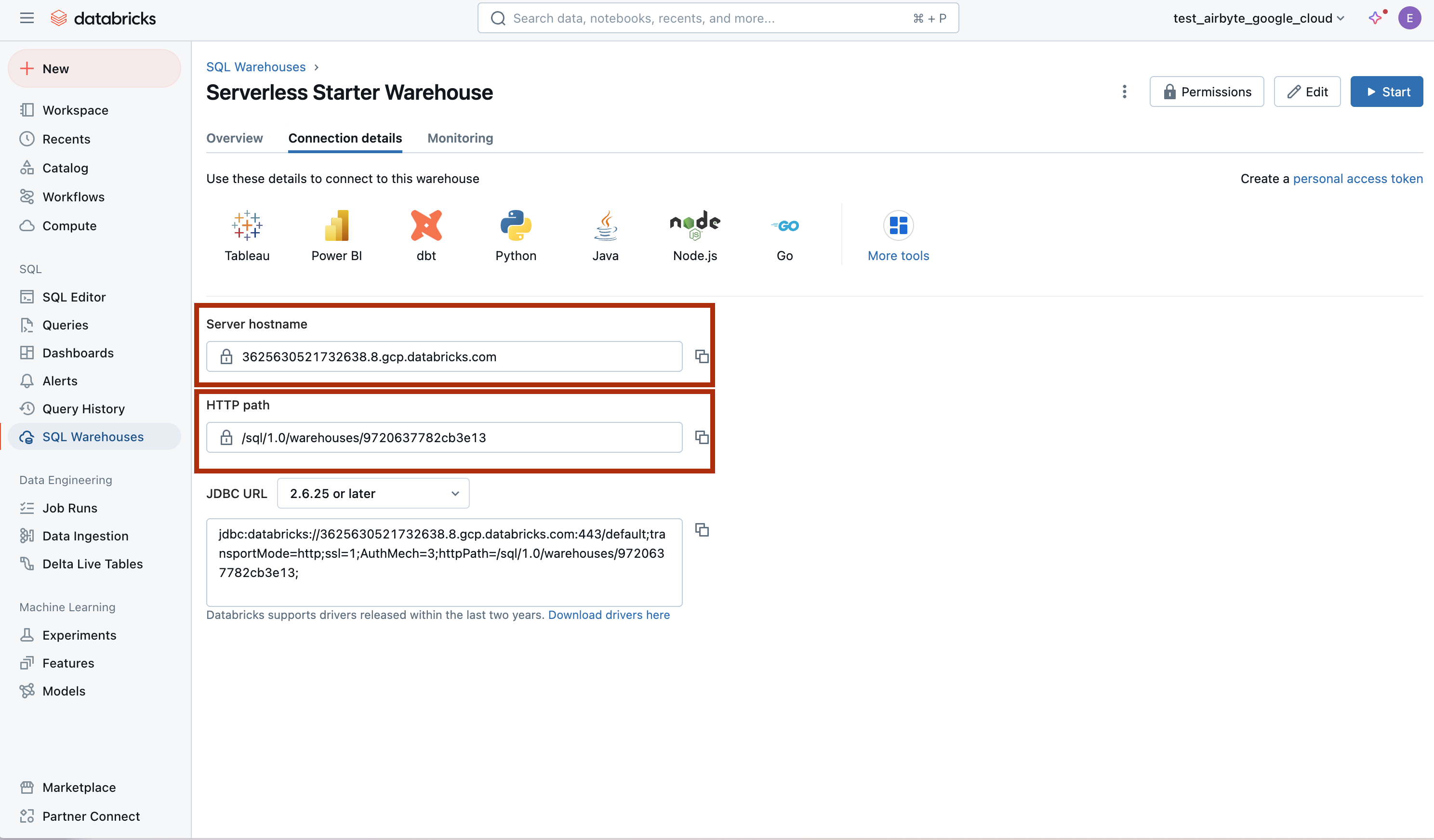
Server Hostname, HTTP Path, and Port
-
Open your Databricks workspace.
-
Navigate to your SQL warehouse:
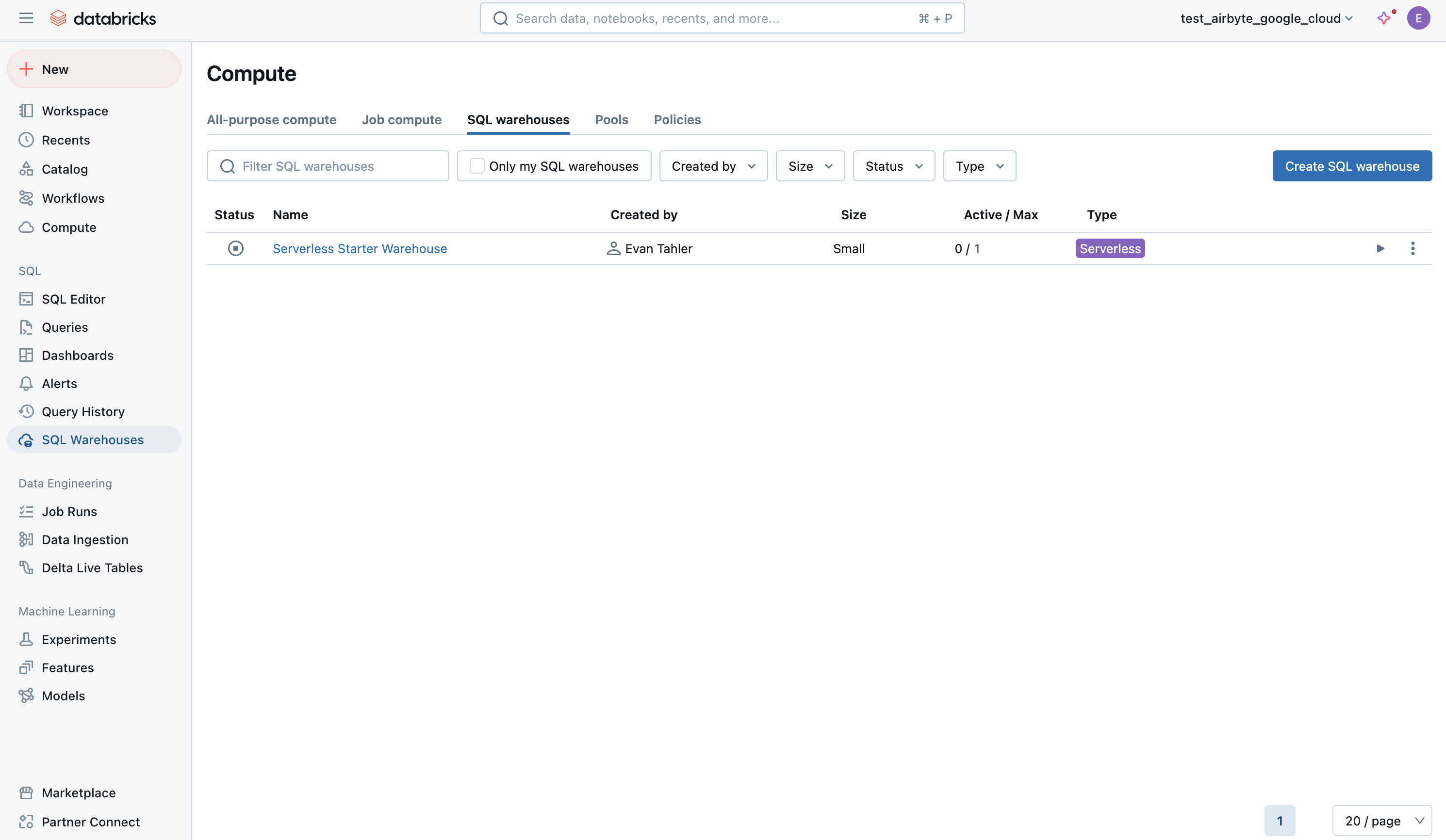
-
Open the Connection Details tab:
-
Note the Server Hostname, HTTP Path, and Port values. The default port is
443.
Unity Catalog Name
You also need the name of the Unity Catalog you want to write to. Find this in the Databricks workspace sidebar under Catalog — it is the top-level catalog name, not a schema or table name.
Authentication
OAuth2 (Recommended)
Create a service principal in your Databricks workspace. Generate a client ID and secret, and grant the service principal access to your target catalog and schema.
Personal Access Token
-
In your Databricks workspace, click your profile icon in the top-right corner and go to Settings > Developer > Access tokens > Manage.
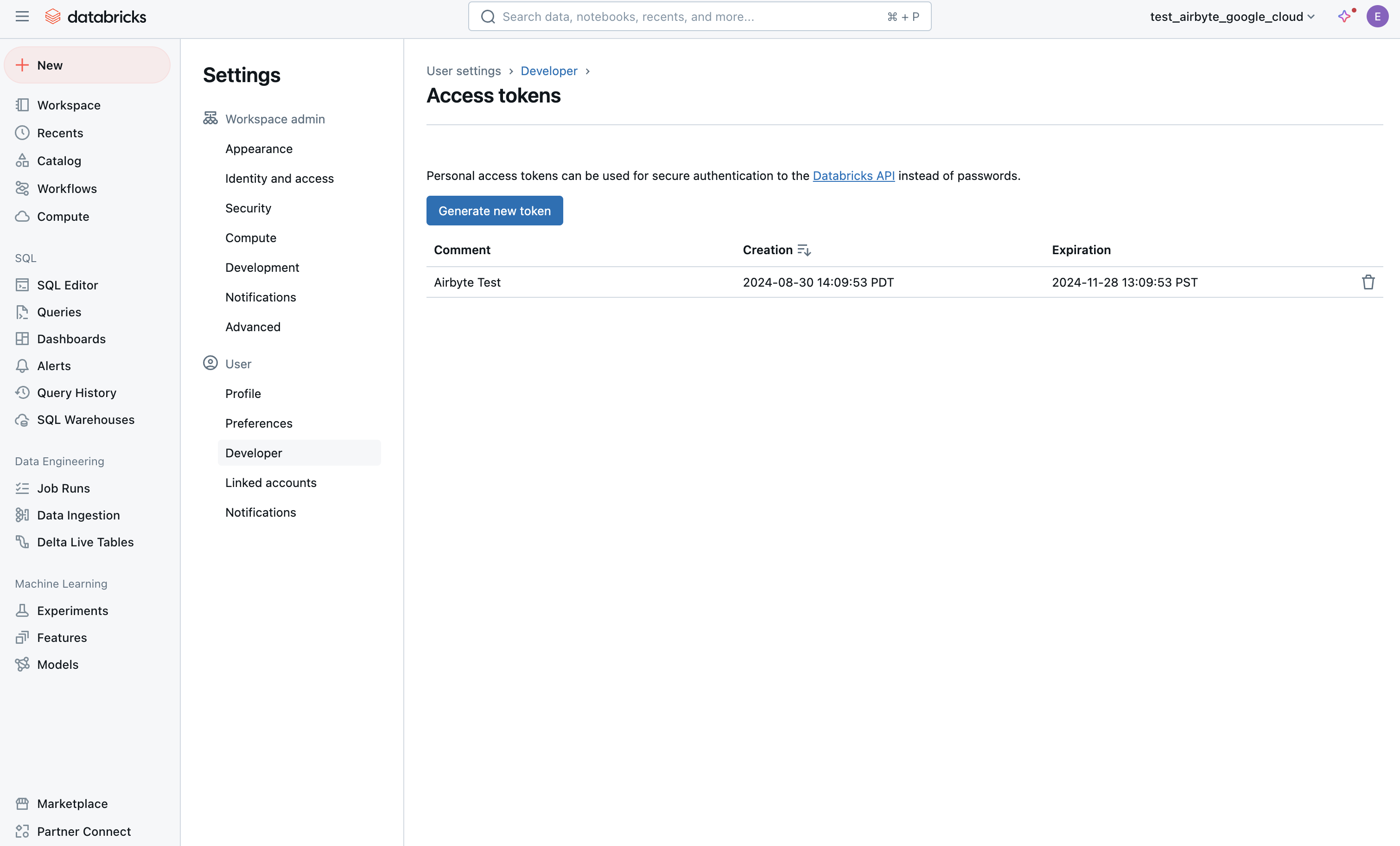
-
Click Generate new token. Enter a description and an expiration period (leave blank for no expiration):
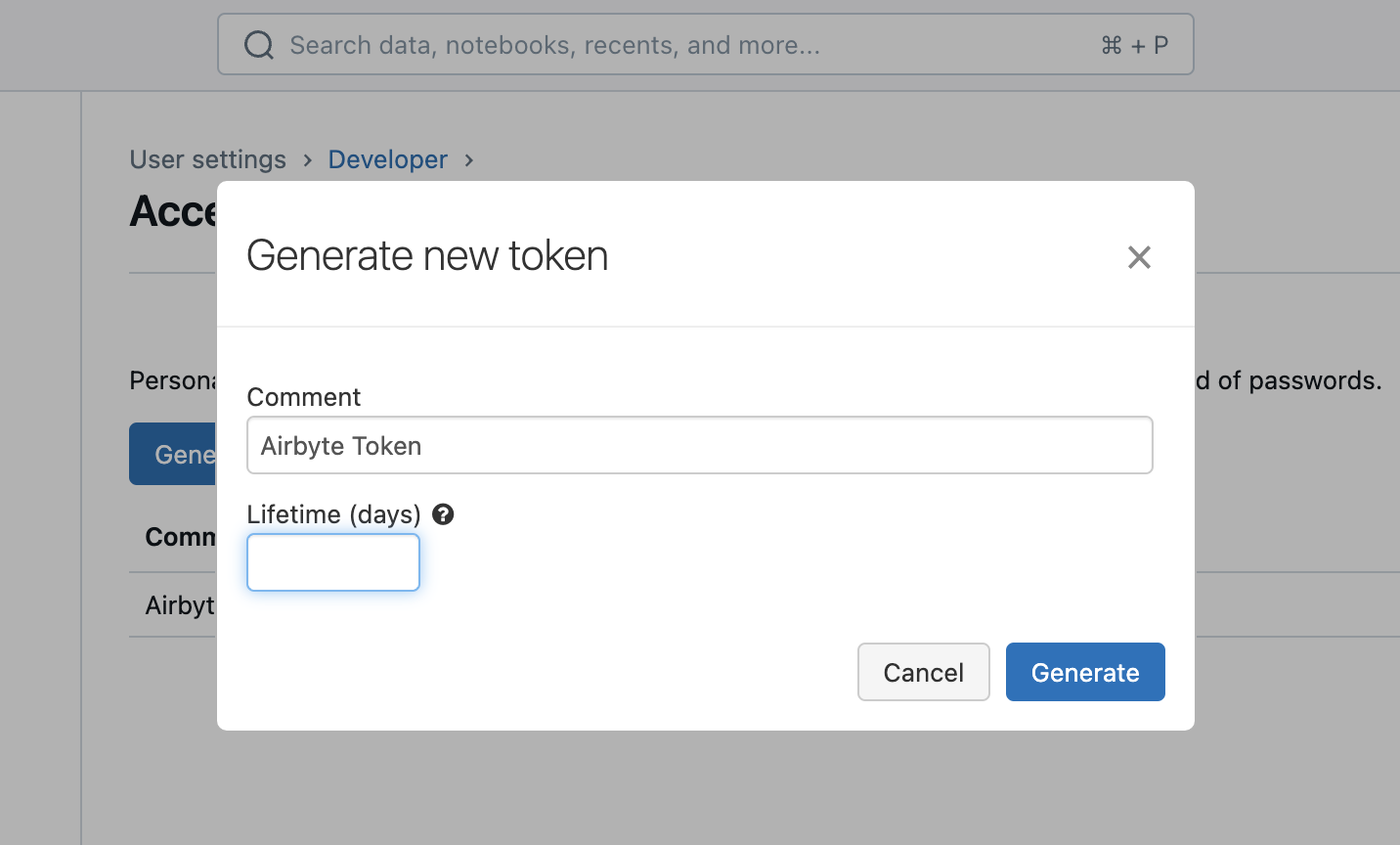
Step 2: Set up the Databricks destination in Airbyte
- Log in to your Airbyte account.
- In the left navigation bar, click Destinations. In the top-right corner, click + New destination.
- Find and select Databricks Lakehouse from the list of available destinations.
- Enter the Server Hostname, HTTP Path, Port, and Unity Catalog Name from Step 1.
- Select your Authentication method and enter the required credentials.
- Accept the Databricks JDBC driver Terms & Conditions.
- Configure the remaining options:
- Default Schema — The schema where tables are created. Defaults to
default. You can override this per-connection. - CDC deletion mode — Controls how CDC deletions are handled. Hard delete removes the row; soft delete keeps a tombstone record with the
_ab_cdc_deleted_attimestamp. Defaults to hard delete. - Purge Staging Files and Tables — Whether to delete staging Avro files from Unity Catalog Volumes after loading. Leave enabled unless you need to inspect staged files for debugging.
- Default Schema — The schema where tables are created. Defaults to
- Click Set up destination.
Supported sync modes
| Sync mode | Supported? |
|---|---|
| Full Refresh - Overwrite | Yes |
| Full Refresh - Append | Yes |
| Full Refresh - Overwrite + Deduped | Yes |
| Incremental Sync - Append | Yes |
| Incremental Sync - Append + Deduped | Yes |
Output schema
Each stream is written directly to a final table in your configured schema. The table includes your data columns plus the following Airbyte metadata columns:
| Column | Type | Description |
|---|---|---|
_airbyte_raw_id | STRING | A UUID assigned to each record by Airbyte. |
_airbyte_extracted_at | TIMESTAMP | When the record was read from the source. |
_airbyte_meta | STRING | JSON object containing sync metadata. |
_airbyte_generation_id | LONG | Tracks refreshes. |
Data type map
| Airbyte Type | Databricks Type | Notes |
|---|---|---|
string | STRING | |
number | DECIMAL(38, 10) | Max 28 integer digits, 10 fractional |
integer | LONG | 64-bit integer |
boolean | BOOLEAN | |
object | STRING | Serialized as JSON |
array | STRING | Serialized as JSON |
timestamp_with_timezone | TIMESTAMP | Microsecond precision |
timestamp_without_timezone | TIMESTAMP_NTZ | Microsecond precision, no timezone |
time_with_timezone | STRING | No native Databricks equivalent |
time_without_timezone | STRING | No native Databricks equivalent |
date | DATE |
Naming conventions
- Schema and table names are lowercased automatically. Databricks treats them as case-insensitive identifiers.
- Column names preserve the casing from your source data.
- Special characters in identifiers are escaped automatically by the connector.
Namespace support
This destination supports namespaces. The namespace maps to a Databricks schema.
Reference
Config fields reference
Changelog
Expand to review
| Version | Date | Pull Request | Subject |
|---|---|---|---|
| 4.0.0 | 2026-07-02 | 80951 | Major rewrite: upgraded to Direct-Load architecture using the Bulk CDK |
| 3.3.8 | 2026-03-11 | 74732 | Add JDBC ConnectTimeout and SocketTimeout to prevent indefinite hangs when Databricks SQL warehouse is paused or unresponsive |
| 3.3.7 | 2025-07-15 | 63311 | Support arbitrary number of streams in findExisitngTable query |
| 3.3.6 | 2025-03-24 | 56355 | Upgrade to airbyte/java-connector-base:2.0.1 to be M4 compatible. |
| 3.3.5 | 2025-03-07 | 55232 | fix table name collision multiple connections same schema |
| 3.3.3 | 2025-01-10 | 51506 | Use a non root base image |
| 3.3.2 | 2024-12-18 | 49898 | Use a base image: airbyte/java-connector-base:1.0.0 |
| 3.3.1 | 2024-12-02 | #48779 | bump resource reqs for check |
| 3.3.0 | 2024-09-18 | #45438 | upgrade all dependencies. |
| 3.2.5 | 2024-09-12 | #45439 | Move to integrations section. |
| 3.2.4 | 2024-09-09 | #45208 | Fix CHECK to create missing namespace if not exists. |
| 3.2.3 | 2024-09-03 | #45115 | Clarify Unity Catalog Name option. |
| 3.2.2 | 2024-08-22 | #44941 | Clarify Unity Catalog Path option. |
| 3.2.1 | 2024-08-22 | #44506 | Handle uppercase/mixed-case stream name/namespaces |
| 3.2.0 | 2024-08-12 | #40712 | Rely solely on PAT, instead of also needing a user/pass |
| 3.1.0 | 2024-07-22 | #40692 | Support for refreshes and resumable full refresh. WARNING: You must upgrade to platform 0.63.7 before upgrading to this connector version. |
| 3.0.0 | 2024-07-12 | #40689 | (Private release, not to be used for production) Add _airbyte_generation_id column, and sync_id entry in _airbyte_meta |
| 2.0.0 | 2024-05-17 | #37613 | (Private release, not to be used for production) Alpha release of the connector to use Unity Catalog |
| 1.1.2 | 2024-04-04 | #36846 | (incompatible with CDK, do not use) Remove duplicate S3 Region |
| 1.1.1 | 2024-01-03 | #33924 | (incompatible with CDK, do not use) Add new ap-southeast-3 AWS region |
| 1.1.0 | 2023-06-02 | #26942 | Support schema evolution |
| 1.0.2 | 2023-04-20 | #25366 | Fix default catalog to be hive_metastore |
| 1.0.1 | 2023-03-30 | #24657 | Fix support for external tables on S3 |
| 1.0.0 | 2023-03-21 | #23965 | Added: Managed table storage type, Databricks Catalog field |
| 0.3.1 | 2022-10-15 | #18032 | Add SSL=1 to the JDBC URL to ensure SSL connection. |
| 0.3.0 | 2022-10-14 | #15329 | Add support for Azure storage. |
| 2022-09-01 | #16243 | Fix Json to Avro conversion when there is field name clash from combined restrictions (anyOf, oneOf, allOf fields) | |
| 0.2.6 | 2022-08-05 | #14801 | Fix multiply log bindings |
| 0.2.5 | 2022-07-15 | #14494 | Make S3 output filename configurable. |
| 0.2.4 | 2022-07-14 | #14618 | Removed additionalProperties: false from JDBC destination connectors |
| 0.2.3 | 2022-06-16 | #13852 | Updated stacktrace format for any trace message errors |
| 0.2.2 | 2022-06-13 | #13722 | Rename to "Databricks Lakehouse". |
| 0.2.1 | 2022-06-08 | #13630 | Rename to "Databricks Delta Lake" and add field orders in the spec. |
| 0.2.0 | 2022-05-15 | #12861 | Use new public Databricks JDBC driver, and open source the connector. |
| 0.1.5 | 2022-05-04 | #12578 | In JSON to Avro conversion, log JSON field values that do not follow Avro schema for debugging. |
| 0.1.4 | 2022-02-14 | #10256 | Add -XX:+ExitOnOutOfMemoryError JVM option |
| 0.1.3 | 2022-01-06 | #7622 #9153 | Upgrade Spark JDBC driver to 2.6.21 to patch Log4j vulnerability; update connector fields title/description. |
| 0.1.2 | 2021-11-03 | #7288 | Support Json additionalProperties. |
| 0.1.1 | 2021-10-05 | #6792 | Require users to accept Databricks JDBC Driver Terms & Conditions. |
| 0.1.0 | 2021-09-14 | #5998 | Initial private release. |